01 / OBSERVE
Read the whole picture.
Prices, funding, open interest, depth and tape. Persistent feeds reconnect and flag stale data so you know what you’re looking at.
CHART + DEPTH + TAPE
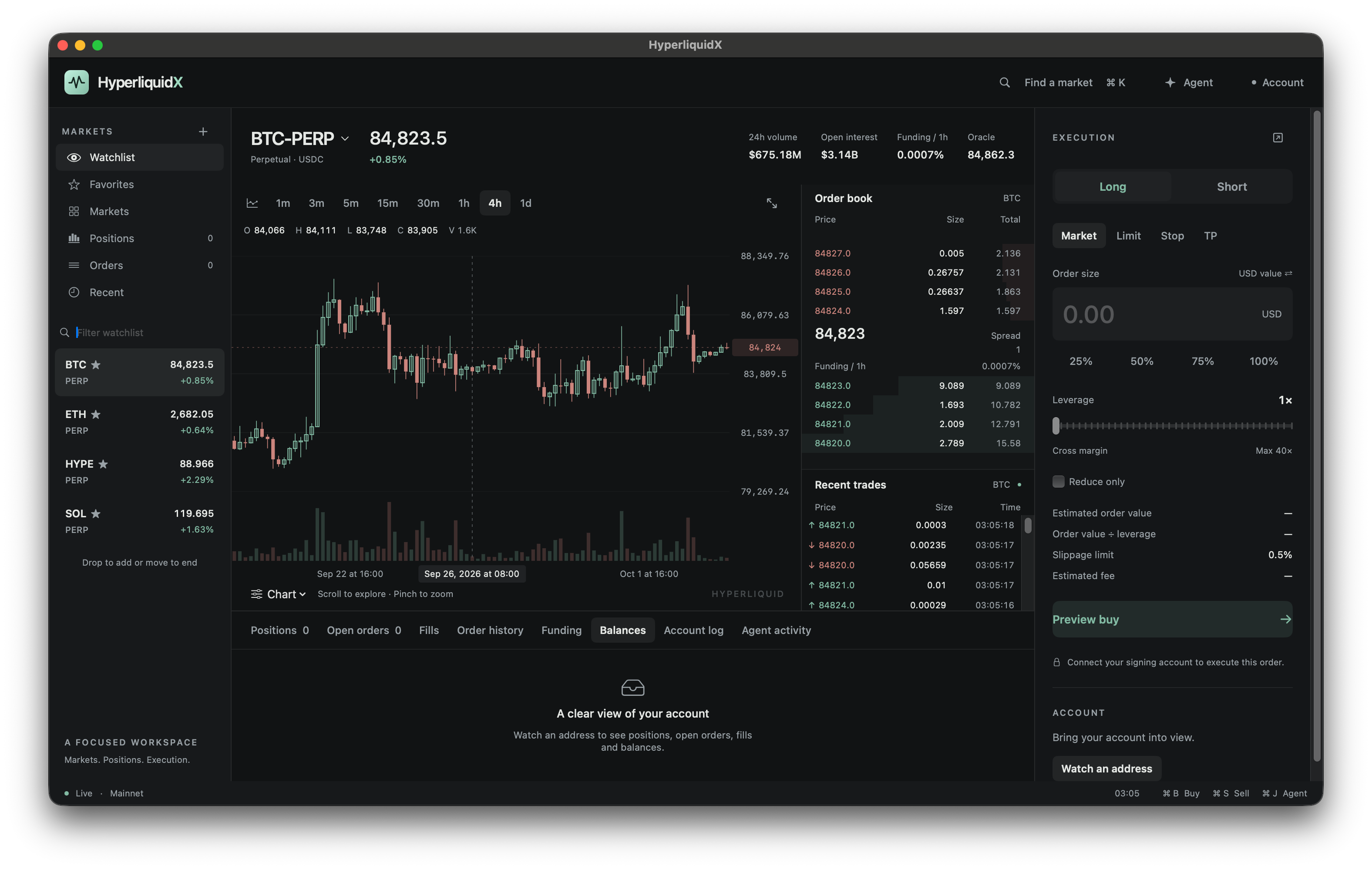
Your markets. Your positions. Your next move.
One native workspace that feels right at home.
macOS 14+ / SwiftUI + AppKit
A little less switching.
A lot more staying in your flow.
Follow the chart, read the book and prepare your next move. Keep your tools together. Make the space your own.
A watchlist, interactive chart, order book, tape and execution panel, with account activity just below. Resize the panels to make it yours.
A focused set of tools for the whole decision, from the first glance to the final confirmation.
Prices, funding, open interest, depth and tape. Persistent feeds reconnect and flag stale data so you know what you’re looking at.
Market, limit and TP/SL drafts. Prepare reductions or reversals, review fees and capacity, then confirm the order yourself.
Familiar shortcuts keep your market, execution and Agent a keystroke away. Optional hold-to-confirm adds a deliberate pause.
Resize panels. Detach execution onto another display. Your layouts, favorites and recent markets are saved for each network.
Your market. Your positions. Your recent fills. Ask your Agent about what’s in your workspace, without jumping to another window.
Prepare supported, editable order intents through the same review flow. Data tools are read-only. Your confirmation stays essential.
Follow what’s nextWhat are we
looking at?
Main-wallet keys stay in your wallet extension. Optional wallet-approved trading sessions keep a temporary signing key in native app memory.
Fees, balances, capacity and price bounds are checked before submission.
Mainnet and testnet have their own app identities and saved preferences.
Position actions and Agent-prepared intents follow the same confirmation flow.
A few details about where
HyperliquidX is today.
HyperliquidX is a native macOS trading workspace for Hyperliquid. It brings live market data, charts, account activity, order preparation and a local Agent together in a SwiftUI and AppKit app.
The app is in active development, and a public installer is not yet available. Source access is currently limited. If you already have access, you can build with macOS 14 or later and a Swift 6 toolchain. Native interaction, wallet compatibility and server-accepted trading verification are still in progress.
Your main-wallet key stays in your wallet extension. If you choose a wallet-approved trading session, its temporary signing key stays in the native app’s memory. Keychain, Secure Enclave and Touch ID integration are on the roadmap.
The Agent’s data tools are read-only. It can prepare supported, editable trading intents, which go through the same order review and confirmation flow as manually prepared orders.
The current app targets macOS 14 or later. Mainnet and testnet have separate application bundles and preferences. Windows, Linux, iPhone and iPad apps are not part of the current implementation.
The roadmap includes more independent windows, multi-market monitoring, Keychain and Touch ID integration, native notifications, exports and richer Agent requests. These are planned features rather than features available today.
A native home for your Hyperliquid workflow.
Follow the build as we bring it to life.
Source access is currently limited. If you already have access, you’ll need macOS 14+ and a Swift 6 toolchain. Run from the repository root:
zsh scripts/build-app.shThe app is created at dist/HyperliquidX.app. Add --testnet to create the separate testnet app. This produces a development build with an ad hoc signature; a notarized public installer is not currently provided.